Product labels from your spreadsheet.
LabelQuick turns a CSV or Excel product list into printable price and barcode label sheets. Your file stays on your computer.
Free. Works in Chrome and Edge.
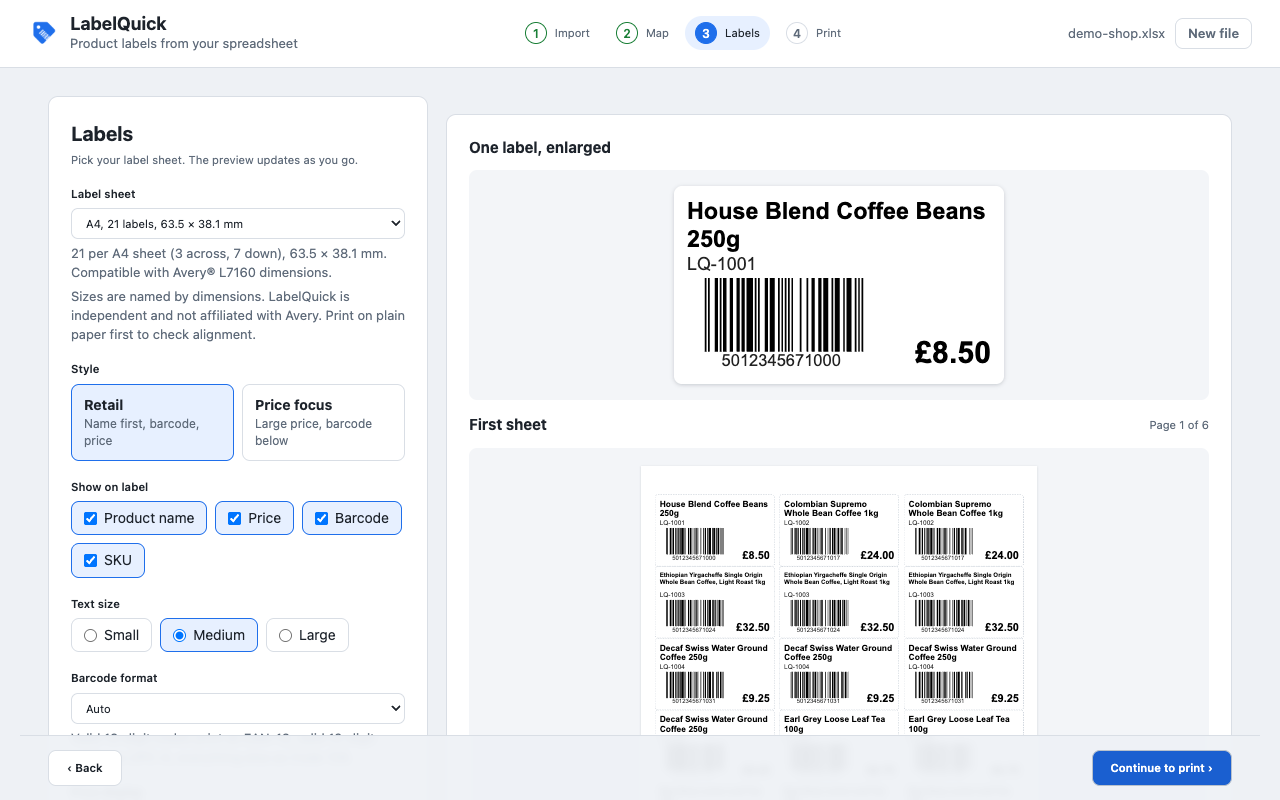
From file to printed sheet
- Drop a .csv, .xlsx or .xls file.
- Check the columns LabelQuick found for name, SKU, price, barcode and quantity. Fix any with one click.
- Pick a label sheet and a label style. The preview shows every sheet as it will print.
- Print, or save as PDF.
What it handles
- CSV and Excel files (.csv, .xlsx, .xls)
- Prices as written in your sheet, or formatted in GBP, EUR, USD or another symbol
- Code 128, EAN-13 and UPC-A barcodes, with check digits verified before you print
- Warnings when Excel has damaged a barcode number, such as lost leading zeros
- A quantity column prints that many copies of each label
- 21 per sheet (63.5 × 38.1 mm), 65 mini labels per sheet (38.1 × 21.17 mm) and 30 per sheet (1 × 2⅝ in)
- Start at any position to finish a partly used sheet
- A calibration page to check your printer prints at 100%
Sheet sizes are described by their dimensions and the Avery® product codes they match. LabelQuick is independent and not made, sponsored or endorsed by Avery Products Corporation. Print a test page on plain paper before using label stock.
Your data
LabelQuick reads your spreadsheet inside the browser and never sends it anywhere. It saves only your label preferences on your device, and asks for one permission, storage. Read the privacy policy.